The Action plan screen
What to do next, ordered by estimated impact, with the evidence behind each card.
What this screen is for
Every other screen tells you where you stand. This one is the only place that says what to do about it, and it says it in your own data: each card exists because something specific was measured on your project this week.
Nothing here is written by a model. The plan is derived by rules from the current state of your analytics, so the same data always produces the same cards. That matters more than it sounds: a card you disagree with can be traced back to the exact citation, search or audit failure that created it.
The plan is recomputed when you open the screen, at most once every fifteen minutes per project. In between, you are reading the last computed set. Cards are matched on a stable key, so a recompute updates the wording and the numbers of a card and never touches the column you put it in.
What you see
Four counters, a strip naming what fed the plan, then the board.

| Counter | What it holds |
|---|---|
| Open actions | Everything not marked done, over the total number of cards. The line underneath splits it into in progress and done. |
| Potential gain | The estimated impacts of your open cards, added up. The bar is captured over captured plus potential, and the line underneath is the same sum over the cards you have closed. |
| In progress | The middle column, on its own tile. It answers one question: how much is being delivered right now. |
| Completed | Everything done, with the count closed in the last seven days below it. That second number is what you quote in a weekly client call. |
Fueled by is a breadth check, not a score. Prompts counts your active prompts, Competitors the brands you declared, Cited sources the distinct domains engines quoted in your recent answers, Communities how many of those domains are platforms we recognise, AI logs the crawler hits of the last fourteen days, and Site audit the score of your last finished audit. Those last two show a dash when there is nothing yet, and the whole strip is cached for ten minutes.
The board itself is three columns, To do, In progress and Done, and inside each one the cards are ordered by estimated impact, highest first. There are no priority levels on this screen. The order is the priority, and the number on the card is the whole argument for it.
| On a card | What it means |
|---|---|
| The tile, top left | The favicon of the cited domain when the card points at one, otherwise an icon for the category. Reddit and YouTube cards are recognisable before you read the title. |
| +N pts, top right | The estimated visibility gain. Green from 3 points up, amber below. |
| Signal, top right | This card has no estimate at all. It is a finding, not a scored task, and it sorts to the bottom of its column. |
| The chips | The category, then the evidence: the domain, the number of citations behind it, the error codes for a log finding. |
| The button | Review the pages when there is a list behind the card. Open the thread, Open the page, See logs or Open audit when there is one destination. Generate brief when there is neither. |
The points are estimated visibility points and they are deliberately capped. A community card is worth 2 points plus one for every 25 citations behind it, never more than 4. A fan-out card is worth 1.5 plus half a point per distinct search, never more than 4. So a domain quoted two hundred times and one quoted fifty times both read +4, and the cap is doing real work there: the estimate is an ordering device, not a forecast of your score.
Where each card comes from
| Family | What creates the card | Estimate |
|---|---|---|
| Cited communities | One card per platform quoted in your answers. It lists every page of that platform, grouped by topic, with a citation count on each line. | 2 + citations / 25, capped at 4 |
| Fan-out searches | One card per topic, three topics at most, built from the searches an engine ran before answering. Only searches attached to prompts you actually track count. | 1.5 + 0.5 per search, capped at 4 |
| Site audit | One card per failed check of your latest finished audit. A check that only warns does not produce a card. Neither does a failure seen only in our bot simulation, with one exception: thin initial HTML, which is a property of the page whichever identity fetched it. | 2.5 for broken cited pages, none otherwise |
| AI logs | Server errors, dead pages, rate limiting and crawl budget spent on pagination, all measured over the last fourteen days of crawler hits. | None, on purpose |
Fan-out cards deserve a word, because they are the only ones built on something the engine did rather than something it published. Before writing an answer, an engine often runs its own searches. Those searches are recorded, and a topic where at least two distinct ones came back becomes a card. It is not a guess at buyer intent. It is the query the engine typed.
What you can do
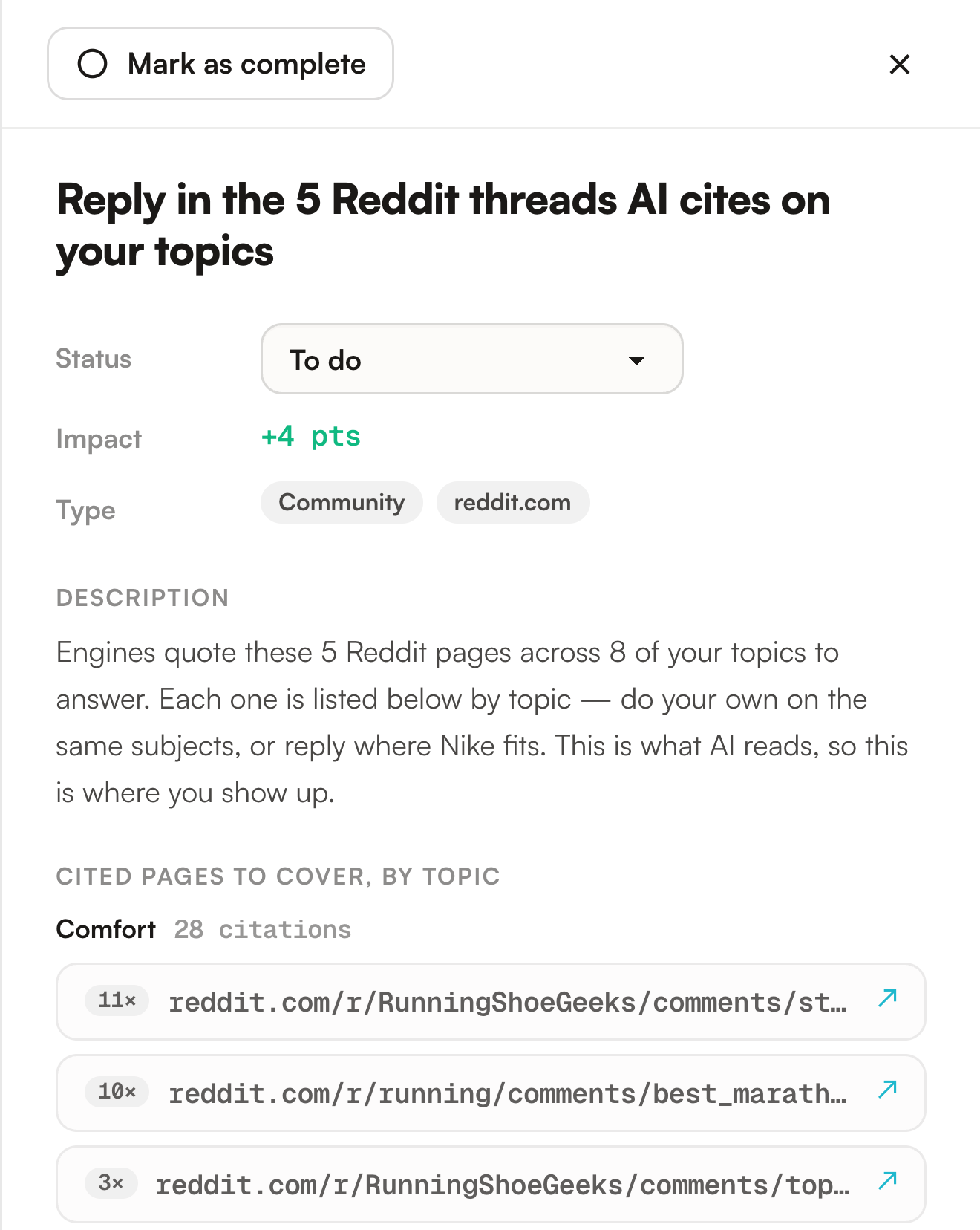
Click anywhere on it. The panel gives you the status, the estimate, the type chips, the description and, on a community card, every cited page grouped by topic with its citation count. Where the card points at a single page instead, the Source line links straight to it.
A thread quoted eleven times and a thread quoted twice are not the same afternoon. The list is sorted for you, most quoted first, inside the most quoted topic.
Drag it to another column, or use the Status dropdown in the panel, or the Mark as complete button at the top of it. All three go through the same path. The card moves on screen straight away and the save happens behind it, so a failed save puts the card back where it was and tells you so.
The comment field at the bottom of the panel takes up to 2000 characters and timestamps each entry. It is where the reasoning goes, and it doubles as protection: a card carrying a comment is never cleaned up, even if the signal behind it fades.
The button in the header copies your open actions to the clipboard, one per line, each with its estimate where it has one. Plain text under the brand name, ready to paste into an email or a ticket.
The titles of the cited pages are resolved when you open a card, not when the page loads, because a card with twelve threads would otherwise mean twelve external requests before you had even looked at it. Up to twenty are fetched per opening and kept for a week. A page whose title cannot be read keeps showing its bare URL, which is what the demo does throughout: it never fetches anything live.
Limits worth knowing
Two more forms of the same restraint. There is a floor: a single page cited on a single topic is the weakest signal there is, and it never becomes a card. And the wording follows the platform rather than a template, in a fixed order: outreach first, then video, then a real discussion forum, then the platform playbook, and nothing at all if none of those fit. A marketplace listing is not a forum reply and a video is not a review, so Amazon reads improve your product page while Reddit reads reply in the threads. A platform we have no sensible move for produces no card.
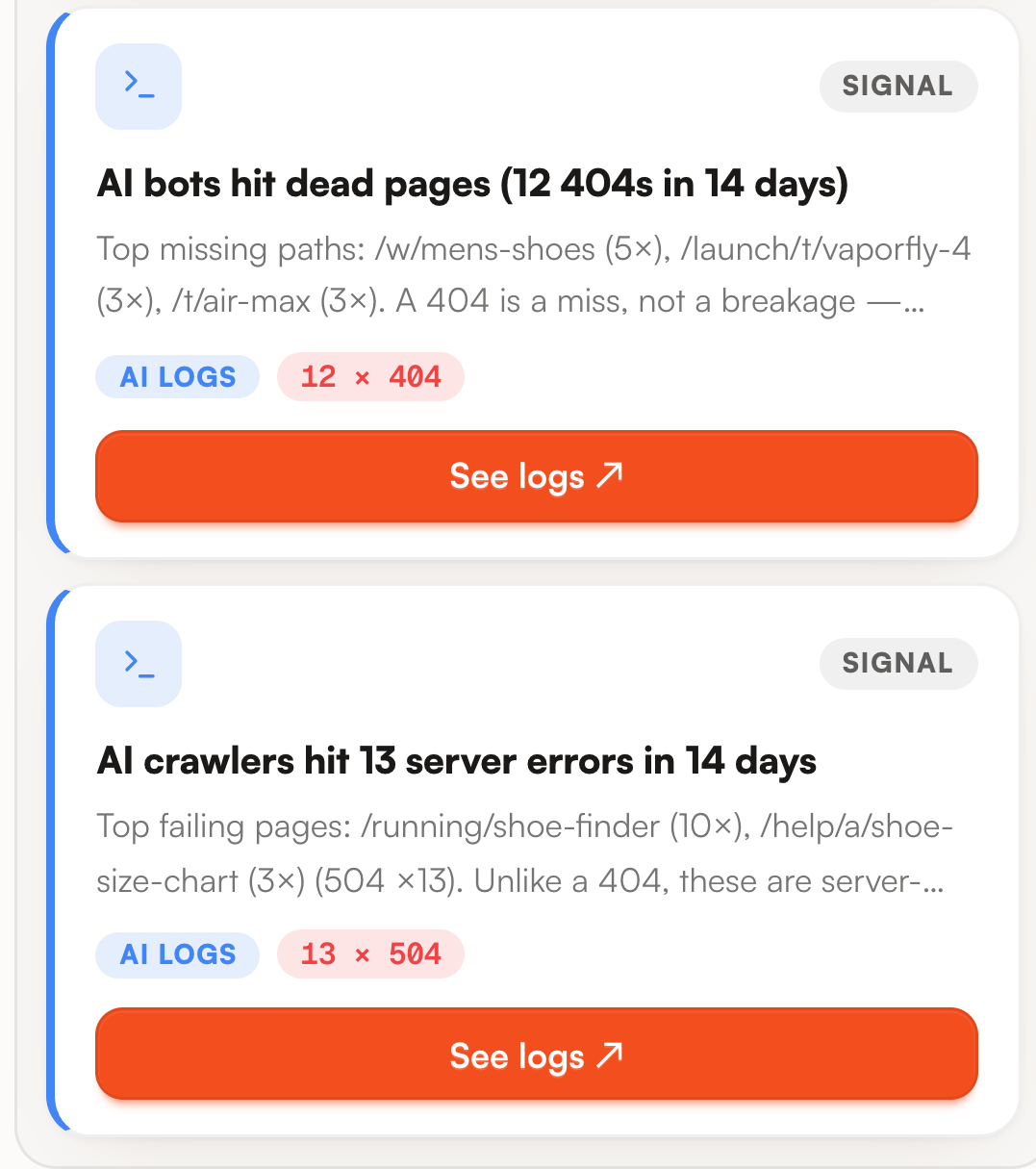
That last point is the one people get wrong. A card with no estimate sorts last, and the sort is the only thing saying so. A crawler getting server errors is not a small job you do after the Reddit threads: it caps everything else you might attempt, because an engine cannot quote a page your server never delivered. Read the Signal cards first and decide for yourself, then work the scored ones in order.
| Limit | What it means for you |
|---|---|
| Points are estimates, not measurements | They rank the work. They do not predict your next score, and the caps mean two very different cards can share the same +4. |
| A fan-out card names searches, not pages | It tells you which subjects the engine looked up on a topic. Choosing which of your pages should cover them is your call, and we do not make it for you. |
| A missing card is not a clean bill of health | Fan-out cards need at least two distinct searches on a tracked prompt, a community needs more than one cited page or more than one topic, and the audit only speaks about the pages it managed to crawl. Silence here means no signal strong enough, never nothing to fix. |
| Three fan-out topics at most | The topics with the highest search volume win. One card per raw search would be a dozen lines of noise, so the rest are not shown. |
| No assignee, no due date | A card carries a status, an estimate and its comments, nothing else. Who does it and by when lives in your own tracker, and the Export button is there for that trip. |
| The demo board never recomputes | It is seeded and read only. Card counts and statuses there are fixed illustrations, not a live plan. |
Where to go next
The plan is downstream of four screens, and a card is often best understood on the one that produced it.
- Sources : the domains behind every community card, with how many of their prompts never name you.
- Fan-out queries : the full list of searches a topic card is summarising.
- Site audit : the failed checks, with the affected pages and the fix for each.
- AI logs : the requests behind a Signal card, bot by bot and status code by status code.
Downstream, the work you log here reaches your client without being retyped. Each weekly report carries the cards in progress and the ones completed in the seven days before the run, six at most between them, followed by your next four to-dos by estimated impact. Past, present and next in one section. The Reports screen has its own page.
For the reasoning rather than the mechanics, the guide on acting and reporting covers how to work a plan week after week, and the guide on finding where you lose visibility is the one to read when the cards do not match what you think your problem is.