The Fan-out queries screen
The searches an engine runs for itself before answering, the domains it reads, and the entities it ties to your market.
What this screen is for
An engine does not always answer straight from the question it was handed. It often types its own searches first, reads what comes back, and writes the answer from that. This screen lists those searches, question by question.
Two things become visible here. What the engine really went looking for behind a buyer question, and which domains feed the answers on your market without ever naming you.
Rows come from two places. One is a dataset of observed AI answers, queried on your own domain for ChatGPT and Google, written when your prompt set is generated. The other is your own tracked prompts: each one is run again in a dedicated execution, on a single engine, with web search on, so the searches it types can be read back. Rows of that second kind carry a Tracked prompt badge.
What you see
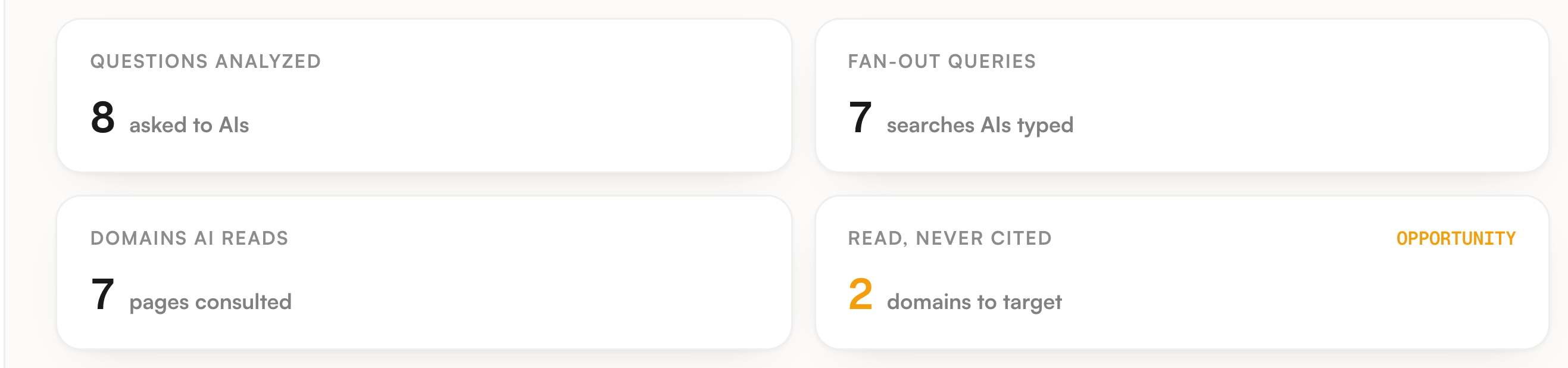
The header repeats the screen name, one line of context and the date of the last capture, which is the date of the most recently updated row. Four counters sit under it.
| Counter | What it counts |
|---|---|
| Questions analyzed | Every captured question, whichever of the two sources it came from. |
| Fan-out queries | The total number of searches typed across those questions. |
| Domains AI reads | Distinct domains across every page read. The caption under the number says pages, the number itself counts domains. |
| Read, never cited | How many domains the card at the bottom of the screen lists. That card stops at six, so this counter stops at six too. |
Then the table. One row per question, four columns, sorted on volume with the highest first.
| Column | What it shows |
|---|---|
| Question buyers ask AIs | The question, then the engine and the model name reported with that answer. A Tracked prompt badge marks a question that comes from your own prompt set. |
| What the AI searched for | One chip per search, ten at most for a question. An empty cell carries a reason, and the two reasons do not mean the same thing. |
| Read → cited | Favicons for the first four domains read, the total number read, and a warning count of domains this one answer read without citing. |
| AI volume | The volume the dataset attaches to that question. Tracked prompt rows carry none and show a dash. |
Above the table sit a search box, one toggle per engine and a count of how many rows the filters leave. The search box matches the sub-queries as well as the question, so you can look for a subject rather than a wording. Tracked prompt rows are captured on ChatGPT, which means the Google toggle hides all of them.
Two cards close the screen. Read, but never citing you lists domains an engine consulted on at least one of your captured questions and used as a source on none of them. Your own domain is left out, the list is ranked by how often a domain was read, six at most, and each row carries the domain so you can go and look at it yourself.

A project with nothing captured yet shows none of this. It gets a single panel explaining what the screen will hold, with a Capture fan-out queries button.
What you can do
On the demo, the prompt about marathon training fans out into a racing shoe comparison and a Vaporfly against Alphafly query. Neither wording appears in the prompt. Those are the subjects the answer got built from, so those are the subjects a page has to cover to be picked up.
Read, but never citing you is a short list, and every line on it is a place the engines already open on your market without quoting it back. Take the domain itself and go look: nothing in Sources will describe it, precisely because it was never cited in any of your answers.
Type a subject in the search box and you keep every question whose fan-out mentions it, including questions that never use the word themselves. The two engine toggles cut the same list by ChatGPT or Google.
The button at the top right refetches the dataset side and reruns the fan-out capture on your tracked prompts. One refresh per project every six days. The marker is written before the run starts, so a run that comes back with nothing still spends the window, and while it holds the button is disabled and says it was refreshed recently. The weekly tracking run captures the tracked prompt fan-outs on its own anyway. The dataset side moves only at prompt generation and on this button.

Limits worth knowing
The table words its two empty cells differently, and neither of them is a verdict. A row captured on Google carries no sub-queries and no read pages at all, and the cell says as much. A ChatGPT row with nothing to show says the answer came from memory: take that as what this one run returned, not as a description of every answer that engine ever wrote on the question.
| The limit | What it means when you read the screen |
|---|---|
| 30 prompts per project | The capture takes your first 30 active prompts by id, then drops duplicate texts, so an exact duplicate does not buy a slot back. Prompts past that point are never captured, and their absence here says nothing about them. |
| One engine, one run | A tracked prompt fan-out is a single dedicated execution with web search, run on the country set on the prompt. It is not the six engines you track, and it says nothing about what the other five searched. |
| No read pages on tracked rows | That run reports the pages it cited, not the pages it read. Promptrack stores no read pages for those rows rather than pass citations off as reads, so Read → cited shows a dash on them and they add nothing to either card. Their cited domains still count when the card decides whether a domain has ever been used as a source. |
| Ten and ten | A question keeps at most ten sub-queries, at most ten read pages and at most ten cited sources. A long fan-out is truncated, not lost. |
| One attempt per prompt | Each prompt is captured by its own job, eight seconds apart, with a single attempt. A technical failure skips that prompt for the week and writes no empty row, which is why a question can be missing rather than shown as silent. |
| Two different never cited counts | On a table row it means read but not cited in that one answer. In the card it means read somewhere and cited nowhere across the whole project. The two numbers are not comparable. |
| The dataset side is domain level | Observed questions are pulled in English on the United States location, up to fifteen per engine, and they are answers where your domain came up rather than a neutral sample of your market. A project scoped to a subfolder gets none of them, because that dataset only reasons on a whole domain. |
Where to go next
This screen names the domains and the subjects. Three other places turn them into work.
| Go to | For |
|---|---|
| Sources | What a cited domain is worth, how many of your prompts it touched and how many of those never named you. |
| Prompts | The set that gets captured. Whether a question sits in the first 30 active prompts decides whether it can appear here at all. |
| Action plan | Recurring searches become one content action per topic, three topics at most, and only where at least two distinct searches were seen on a question you actually track. |
The guide Find where you lose visibility puts this screen at step four, once Prompts, Competitors and Sources have each ruled out a cause.