The Topics screen
Your prompts grouped by buying theme, with the podium of brands on each and where you land.
What this screen is for
A prompt is one question. A topic is the buying decision sitting behind several of them. This screen answers what the Prompts table cannot: not where you stand on one question, but which parts of your market the engines associate with you.
A topic is the tag carried by the prompt. It is proposed when your set is generated, where the model groups your prompts into 4 to 8 clusters and labels each one with 1 to 3 words in Title Case. Nothing about it is locked. You can rename a topic, move prompts between topics, or clear the field and leave a prompt out of the grouping.
Two prompts land on the same row when their topic text is identical. Grouping is on the exact text, so Trail Running and Trail running are two separate rows. That is why the Add prompts box suggests the topics already used in the project instead of leaving you to retype them.
Topics in the sidebar and the By topic toggle above the Prompts table open the same view. One route, two ways in.
What you see
One row per topic, sorted by your share of voice. The row at the top is the theme you own most, not the one carrying the most prompts.
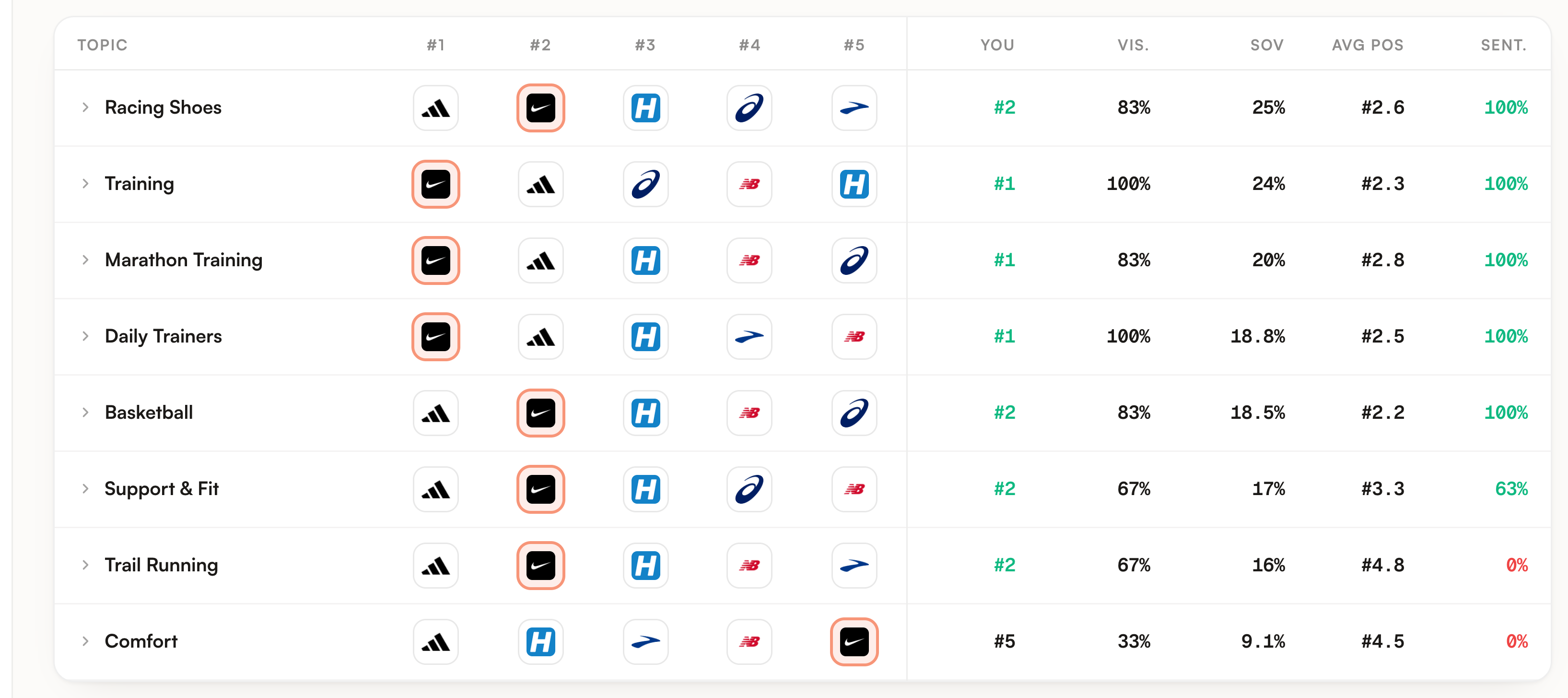
| Column | What it holds |
|---|---|
| Topic | The topic itself, with a chevron. The whole row is a toggle. |
| #1 to #5 | The five brands named in the most answers of this topic, in that order. Your own logo carries a coloured ring. Hover a logo for the brand name and its share, and your own reads You. A brand with no known domain shows its initial instead of a favicon. |
| You | Your place in that same leaderboard, in green up to #3. Not ranked means no answer in this topic named you at all. |
| Vis. | 100 times the answers citing you, divided by every answer counted in the topic. |
| SOV | Your mentions over the mentions of every brand in the topic. A brand counts once per answer, however many times that answer names it. |
| Avg pos | The average rank the engines gave you, across the answers that named you and placed you in a list. |
| Sent. | The share of positive among the answers that named you and carried a sentiment. Green at 60% and above, red under 40%. |
Every number is the current state. For each prompt and each engine we keep the most recent analysed answer found in the last 8 runs, count it once, and build the row from that set. Nothing here adds eight weeks together.
A topic row is not the average of the prompt rows under it. It is recomputed over all the answers of the topic pooled together. On the demo, Support & Fit reads 63% sentiment while its two prompts read 100% and 0%, because the pool counts answers and averaging two percentages does not.
Two empty-looking cells mean different things. Not ranked in the You column is an absence: nothing in this topic named you. A dash under Avg pos on a row whose visibility is above zero is the third state people miss: the engines wrote about you in prose and never put you in a ranked list, so there is no position to average.
What you can do
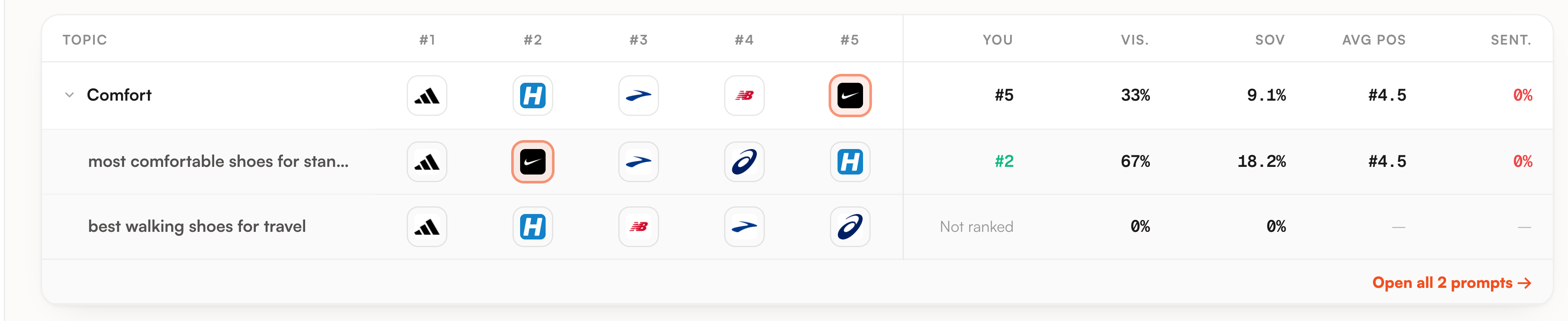
Click the row. The prompts appear in the same columns, best rank first and the unranked at the bottom. Same vocabulary, one level down.
A topic at 33% is rarely 33% everywhere. It is usually one prompt fine and one prompt absent, and only one of those is worth an afternoon of work.
The field above the table filters on the topic name as you type, and the counter next to it says how many topics you have. Useful past a dozen, pointless below that.
Open all N prompts, at the bottom of an expanded topic, takes you to the By prompt view filtered on that topic. The engine you had selected follows you there.
Select rows in the By prompt view and use Set topic in the bar that appears. Up to 30 characters, and an empty value clears the topic. This is how a set generated on day one becomes a set that matches how you actually sell.
Limits worth knowing
| Limit | What it means for you |
|---|---|
| Prompts with no topic are absent | There is no catch-all bucket on this screen. If half your prompts carry no topic, the table describes the other half and says nothing about them. |
| The date range does not apply | The Prompts table is bounded by the range in the header. This one is not: it always reads the last runs. Applying a range from here also drops you back into the By prompt view. |
| The engine filter is inherited, not shown | There is no engine control on this screen. If one engine was selected before you switched to By topic, every number here is that engine alone. Switch back to By prompt to change it. |
| An expanded topic lists 8 prompts | The rows under a topic stop at eight, and only prompts with an analysed answer produce one. The link underneath counts every active prompt of the topic, so the two numbers can differ. |
| A red 0% is not proof of criticism | Sent. is the share of positive. On the demo, Comfort reads 0% because the four answers naming Nike there were all recorded as neutral, not because anyone was negative. |
| No movement over time | These rows are the current state, with no arrow against last week. The trend column on Prompts and the charts on the Overview carry the history. |
Where to go next
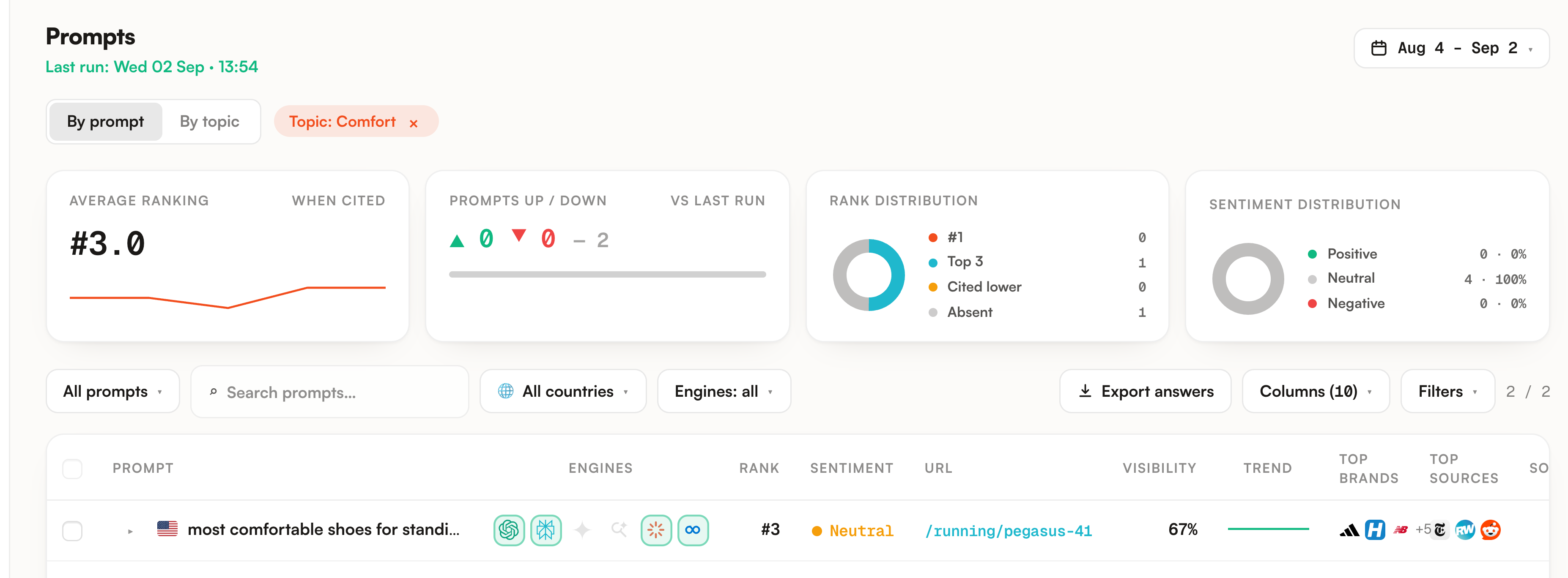
The link at the bottom of an expanded topic is the natural exit. It lands on the Prompts screen with the topic filter on, and every number there is recomputed on those prompts alone: average ranking, rank distribution, sentiment, the whole header.
From a topic you are losing, the sequence is short. Competitors tells you who owns it and the sentences the engines use to recommend them. Sources tells you what those answers were built from. The guide on finding where you lose visibility runs that sequence end to end.