The Competitors screen
Every brand an engine names while answering your prompts gets a row here, whether you declared it or not. They are measured on exactly the same signals as you, so the table reads as one ranking rather than two lists.
What this screen is for
Your visibility tells you how often engines name you. It does not tell you who they name in your place. This screen answers that second question, on the same analyzed answers.
The analyzer that reads each answer is asked to report every distinct brand the answer mentions, not only the ones on your competitor list. Companies you have never considered rivals therefore show up, because an engine put them in front of your buyer.

| Counter | What it counts |
|---|---|
| Brands detected | Rival brands found in the current state. The line under the number is the size of that state, the count of analyzed answers it was built from. Your own brand is not part of the count, which is why the table always carries one more row than this number. |
| Your share of voice | Your mentions as a share of every brand mention in those answers, with the move since the previous state. |
| Market leader | The brand with the highest share of voice other than you. It never carries your own name, even when you are ranked first. |
| Gap to leader | That brand's share minus yours, in points. When you are level with it or ahead, the counter reads You lead instead of a number. |
What you see
One row per brand. The table is built from the current state, which means the last analyzed answer for each prompt and engine pair over the last eight runs. It is a snapshot of where things stand, not a running total since you signed up.
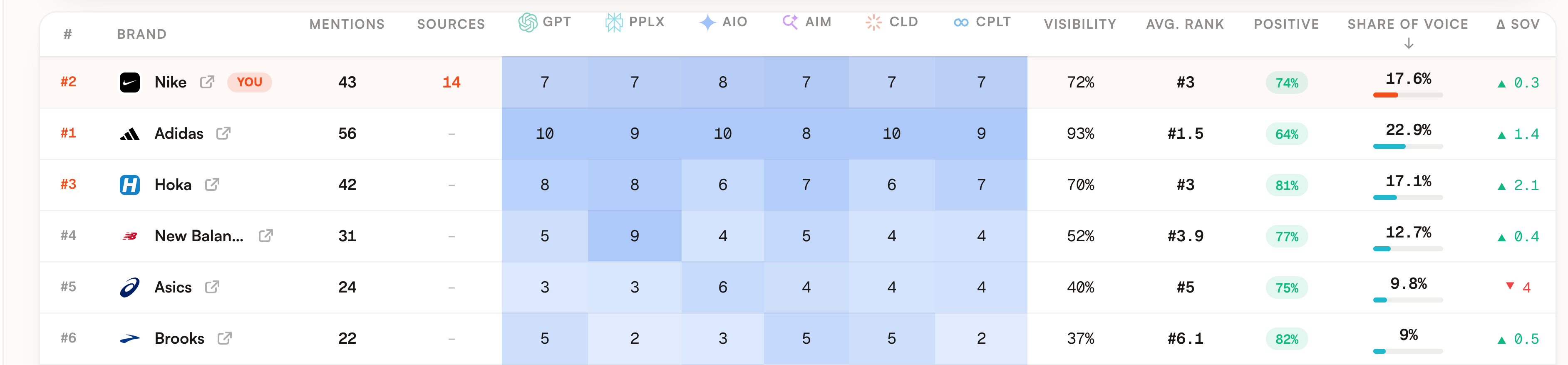
Your own brand is pinned to the first row and stays there when you sort. The number in the first column is its real rank, on a single ranking shared with every other brand, so the row right under you can carry a lower number than yours.
| Column | What it means |
|---|---|
| Mentions | How many answers name the brand. A brand named three times inside the same answer counts once. |
| Sources | How many answers cite a page on that brand website. It is a different signal from Mentions, and the number links to Sources filtered on that domain. On the demo, Adidas is named in 56 answers with no citation of its own site, while Nike is named in 43 and cited in 14. |
| One column per engine | How many of that engine answers name the brand. The blue background is relative to the strongest cell in the column, so it reads as a heatmap down each engine. The Counts and % switch above the table turns those cells into the share of that engine answers mentioning the brand. |
| Visibility | The same mentions as a share of all analyzed answers, all engines together. |
| Avg. rank | A position is the place of the brand inside one answer, counted in order of first appearance among every brand that answer names. This column averages the positions the brand actually got. A brand cited in prose with no ranking produces no position at all, so a row can hold plenty of mentions and still show a dash here. |
| Positive | Among the mentions the analyzer scored, the share framed positively. The pill is green at 60% and above, amber from 30%, red below. A dash means no mention of that brand carried a sentiment. |
| Share of voice | The brand mentions divided by every brand mention counted in the state, yours included. The bar under the number is drawn at twice the percentage, so it fills at 50%. |
| Δ SOV | The move in share of voice against the previous answer of each prompt and engine pair. A brand that was absent from that previous state counts as zero, so a newcomer shows its whole share as a gain. |
Above the table, three tabs split the same rows. They map to three ways a brand can end up on this screen.
| State | How it got there | Where you find it |
|---|---|---|
| Declared | You put it on the competitor list, at onboarding or from this screen. | The Tracked competitors tab, and a Tracked chip in its modal. |
| Detected | An engine named it on your prompts and it is not on your list. | The banner at the top, up to six at a time, ranked by share of voice. |
| Discovered | The same brands, seen from the table rather than the banner. | The Discovered tab, which holds all of them, including the ones you dismissed from the banner. |
Detected and discovered are therefore the same set at two moments. The banner proposes the first six you have not dismissed, the tab keeps every one of them. A discovered brand is scored on the same columns as a declared one, so declaring changes what you can filter on rather than what the brand is worth.
What you can do
The banner is the shortest path from a brand you did not know about to a brand you follow.

The number on a chip is how many of your analyzed answers named that brand. A brand at one or two mentions is noise from a single question. A brand in double digits is competing with you in the answers your buyers read.
Clicking a chip tracks that brand, Add all tracks the whole banner. The page reloads and the rows move to the Tracked competitors tab. Declaring a brand with its domain also merges its mentions under one identity, so answers that name it without a link stop forming a second row.
The cross hides the brands currently shown, for this project, permanently. Nothing is deleted: they keep their rows and their numbers under Discovered, and the banner comes back when the engines name someone new.
Clicking any row opens that brand. The modal opens on four counters: mentions, prompts covered, average rank, and the share of scored mentions that are positive, with a bar splitting positive, neutral and negative.
Under them, What AIs highlight is a short read of the passages where the brand appears, a one line summary followed by the recurring praise and the recurring reservations with how often each came up. Below that, Citations by topic groups every mention under the topic of the prompt that triggered it, with a tab per engine when more than one named the brand, and prompts you never tagged collected under Other prompts. Each line carries the prompt, the position, the sentiment, the date, the exact sentence with the brand highlighted, and the cited pages from its domain.
That sentence is the part worth reading slowly. An engine that recommends a rival usually says why, and the why is a claim that brand makes somewhere and you do not.
Your own row opens the same way, on your brand data rather than a competitor entry. The rest of the screen is sorting and filtering: every column header sorts except the rank number, your row stays first whatever you sort on, the tabs filter, the Counts and % switch changes the unit of the engine block, and a Sources number jumps to the Sources screen already filtered. Clicking a brand in the Top brands card of the Overview screen lands here with its modal already open.
Limits worth knowing
A competitor you declared but that no engine has ever named has no row at all. The table is built from mentions, so an empty competitor is absent rather than shown at zero, and the Tracked competitors tab only lists the declared brands that turned up in an answer.
The Sources column matches the exact host of the brand. A citation on a subdomain does not count toward the bare domain, and a brand the engines never attach a domain to shows a dash even when its site is being cited.
Average rank and Positive are computed only on the mentions that carry the information. Neither is a score out of the total, and a dash in either column means the analyzer never recorded that signal for the brand, not that the brand did badly.
The competitor list holds twenty brands. Past that, adding from the banner keeps the list you already have and drops the extras, so remove a brand you no longer care about before adding another one. One answer can also contribute at most fifty distinct brands, which only bites on answers that read like a directory.
The modal lists fifty mentions at most, best position first, and counts the rest under the list. Its four counters are computed before that cut, so they stay right on a brand cited more than fifty times.
What AIs highlight needs at least four distinct cited passages, otherwise it says so rather than guessing. It is computed once per brand and kept for a month, so read it as a stable picture of how engines talk about a brand, not as a signal to watch run after run.
On the public demo, adding and dismissing are disabled and the traits panel is served from cache only.
Where to go next
You now know who is being recommended. Sources tells you what the engines were reading when they recommended them, which is usually where the answer starts. Prompts shows the questions themselves, one row each, including the ones where nobody named you.
If you came here because your score dropped, the guide Find where you lose visibility runs the five screens in the order that rules out one cause at a time.