The Site audit screen
Whether AI crawlers can reach and read your pages: bot access, indexability and content readiness.
What this screen is for
Every other screen measures what the engines said about you. This one measures whether they can get to your pages at all. Three questions, in this order: are the AI crawlers allowed in, do your pages answer when something fetches them, and is there anything readable in the HTML when it arrives.
The audit is a crawl, not an engine call. It sends no prompt anywhere, so launching one costs you nothing from your weekly run.
It runs on its own every Tuesday, once per brand that has a domain. Your prompts go out on Monday, the audit follows the next morning. Nothing runs at signup: your first audit is the one you launch with the Run audit button, or the next Tuesday pass.
What you see
The line under the title says when the last audit finished, that it ran from Promptrack infrastructure, and how many pages it looked at. When the run could not finish everything it had planned, it adds partial run in amber.
The score and its three categories
On the left, one number out of 100 in a ring that turns amber below 80 and red below 55, the change against your previous audit, and a small bar chart of the last twelve. On the right, three cards. Our Nike demo scores 87 overall, with Bot access at 100, AI indexability at 92 and Content readiness at 71.
The overall score is not the average of those three. Four categories go into it, weighted, and the fourth has no card of its own.
| Category | Share of the score | What it holds |
|---|---|---|
| Bot access | 0.35 | robots.txt rules for the AI crawlers, bot identity probes, and verified bots denied in your logs. |
| AI indexability | 0.25 | HTTP status of the crawled pages, cited pages that broke, noindex and noai directives, redirect chains. |
| Content readiness | 0.15 | Homepage over HTTPS, sitemap, llms.txt, thin initial HTML, slow pages, JSON-LD, canonical tags, markdown negotiation. |
| Live crawler data | 0.25 | Error rate and median response time measured on real AI crawler requests. No card at the top, but it appears as a chip on its findings. |
Inside a category, checks are not equal either. A critical check weighs 3, a warning 2, an informational one 1. A pass counts in full, a warning counts half, a failure counts zero. A check that could not be established at all is skipped rather than counted against you.
The robots.txt panel, crawler by crawler
This panel is a straight read of your robots.txt against every AI crawler Promptrack knows by name, nineteen of them today. Two rows: Allowed with its count, Blocked with its count. It deliberately covers more crawlers than the engines you track, because a crawler you never think about can still be shut out.
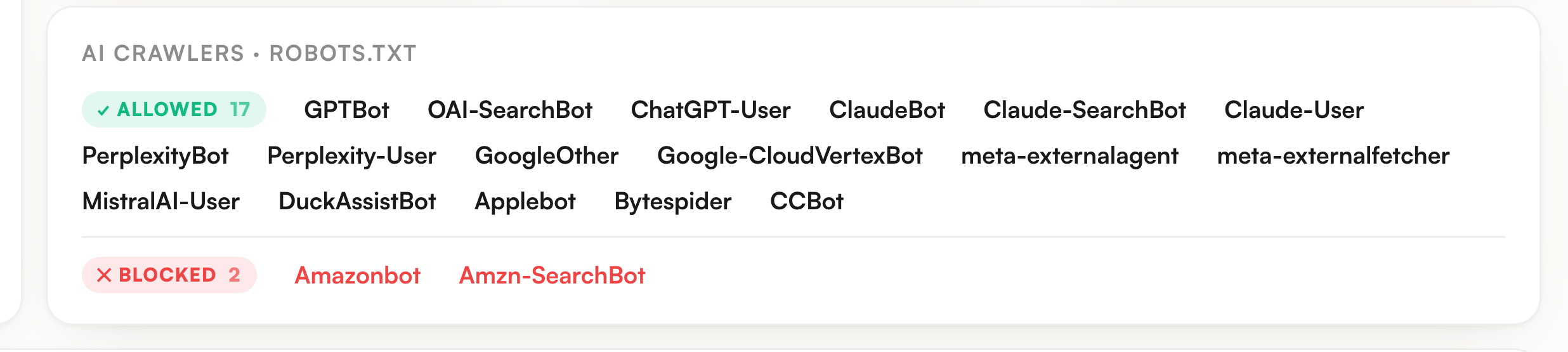
Only seven names can actually fail the check: GPTBot, OAI-SearchBot, ChatGPT-User, ClaudeBot, Claude-User, PerplexityBot and Perplexity-User. Blocking anything else shows in red without moving the score. A wildcard Disallow that shuts out every crawler at the root is a separate finding, and it is critical.
Site files
The strip under the scores gives one marker each to robots.txt, sitemap.xml and llms.txt. Each marker means something slightly narrower than the file name suggests.
| File | Green means | Worth knowing |
|---|---|---|
| robots.txt | nothing in robots.txt keeps the AI engines you track out | The marker is about the rules, not about the file existing. No robots.txt at all is green, since the convention allows everyone. A root-level block on everyone turns it red. |
| sitemap.xml | a sitemap was found | A Sitemap line inside robots.txt counts as found, even when the sitemap itself sits behind a firewall. |
| llms.txt | the file exists and it is a real text file | A question mark means the request came back challenged, so presence could not be decided. An HTML page served at that address counts as absent, not present. |
Issues, and the fix behind each one
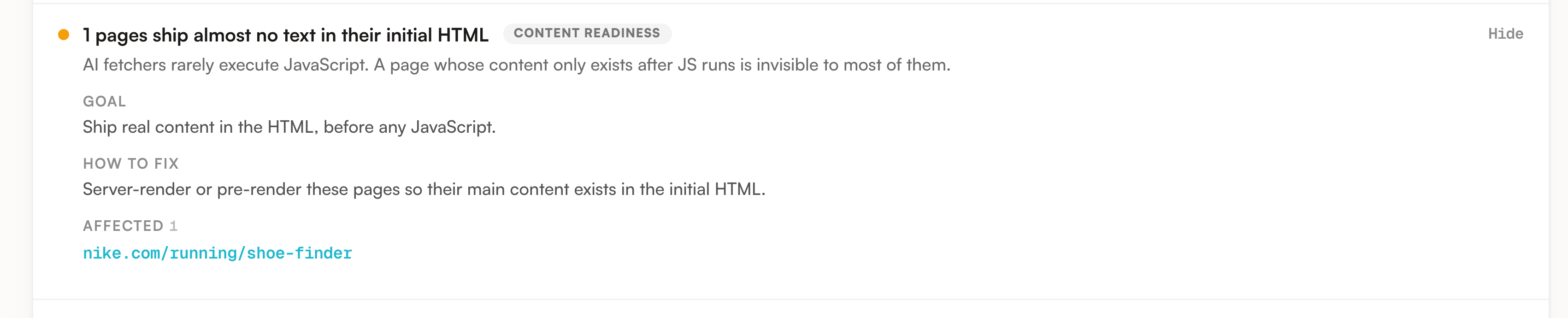
Below the files sit the findings that are not clean: failures first, then warnings, criticals before warnings before informational ones. Each row carries a plain sentence, a category chip, and how many items it concerns. Everything that passed is listed underneath in its own block, open by default.
Open a row and you get Goal, which is what good looks like, How to fix, which is the change to make, the affected URLs up to twenty, and reference links when the check has any.
How a finding was established
Every check carries the way we know it, and that changes how hard you should push on it.
| Mode | How we got it | What it proves | What it does not prove |
|---|---|---|---|
| Declared | Read from what your site publishes or answers: robots.txt, HTTP status, meta robots, X-Robots-Tag, canonical, JSON-LD. | What the site says, and what it served our request. | That every crawler is treated the same way you were. |
| Simulated | Promptrack made the request itself from our own infrastructure, sometimes wearing an AI bot user agent, with a browser request as the control. | What our client was served, which is also roughly what a plain AI fetcher gets. | That a verified crawler is blocked. A CDN can allow verified bots from official ranges and refuse ours, so this is an indication and never an accusation. |
| Observed | Counted in your AI logs over the last 14 days, and for the blocking check only on bots Cloudflare verified. | What real crawlers were actually served. This is ground truth. | Anything, when no logs are connected. The check then says it has no data instead of guessing. |
The audited pages table
One row per page the audit crawled, cited pages first. Three scopes, All, Cited and Issues, plus a box that filters on the path. All of it runs in your browser, so nothing reloads.
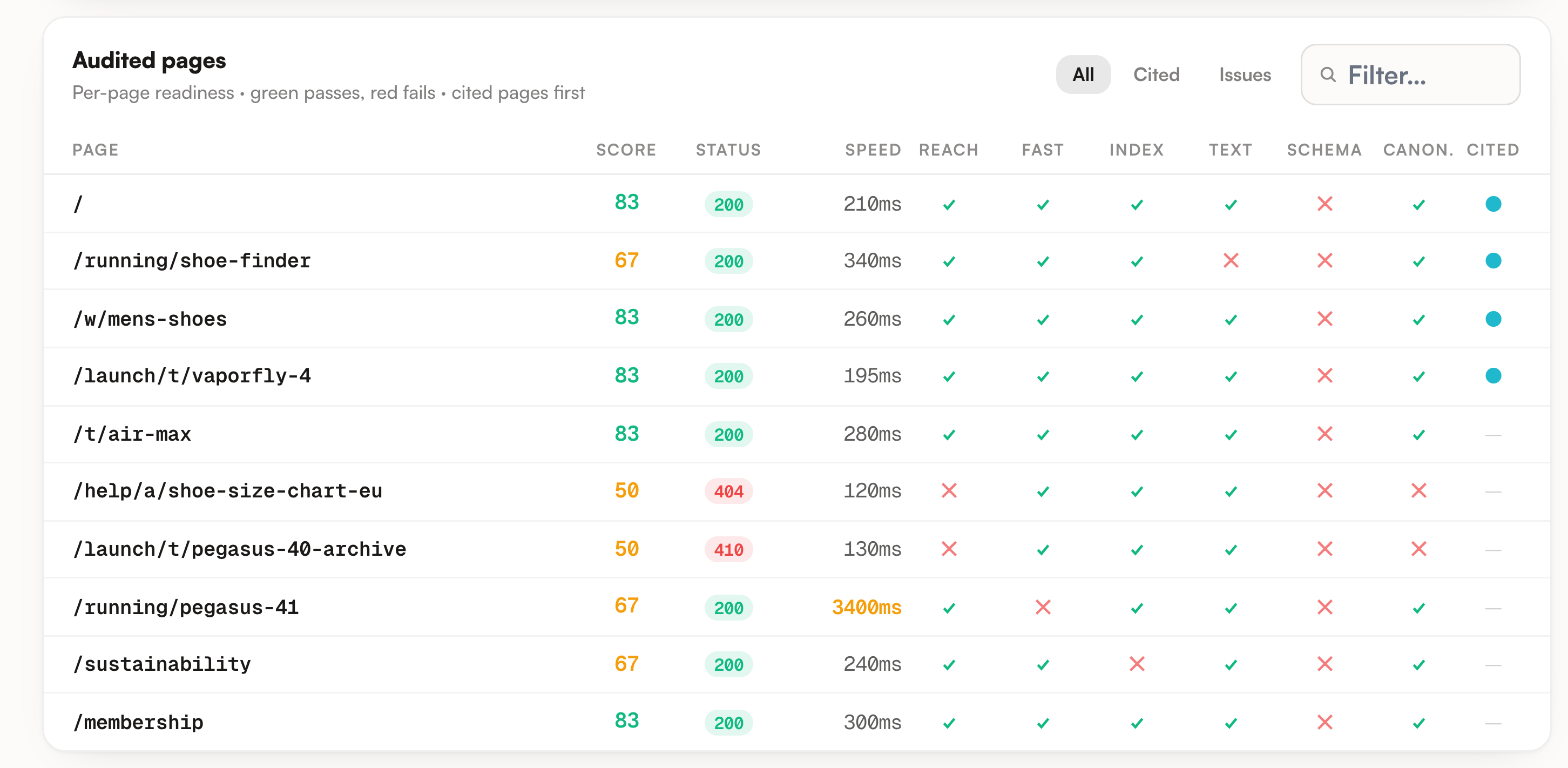
| Column | What it says |
|---|---|
| Score | The share of the six signal columns that the page passes, so it moves in steps of about 17 points. Green from 80, amber from 50, red below. |
| Status | The HTTP status we got. Green on 200, red on 404, 410 and server errors, amber on redirects and firewall answers. A dot next to it means your logs show a verified bot being served fine there, and that result wins over ours. |
| Speed | Time to first byte, measured from our infrastructure during the crawl. Over 3000 ms it turns amber. |
| Reach | The page answered 200 to us, or your logs show a verified bot being served fine there. |
| Fast | It answered in under 3000 ms. |
| Index | No noindex and no noai, whether in the meta robots tag or in the X-Robots-Tag header. |
| Text | The initial HTML carries real text. Under 400 characters once scripts and styles are stripped counts as thin. |
| Schema | A JSON-LD block is present on the page. |
| Canon. | A canonical link is present on the page. |
| Cited | An AI answer cited this URL. Those rows sort to the top. |
Agent readiness, measured apart
Under the passed checks, an audit that collected them shows a second gauge with a level and its own list of checks. It measures emerging agent standards, things like MCP server cards, OAuth metadata, Content Signals and commerce profiles, and it never feeds the score above. A content site scoring low there is normal. The button at the bottom of that panel downloads the whole thing as markdown for a coding agent.
What you can do
Bot access first: while a crawler is shut out, nothing downstream can be measured properly. Then AI indexability, which is where you lose citations you already earned. Content readiness last, because it is the slowest to move and carries the smallest weight.
Only a failing check turns into a task on your action plan, and a purely simulated failure never does, with a single exception for thin initial HTML. Broken cited pages are the only audit finding that carries an impact score, so they land in the ranked part of the plan; the rest arrive without one.
On a failing check, one button copies the summary, the goal, the fix and up to twenty affected URLs as a single instruction. It is the fastest path from a finding to a pull request.
A cited page that 404s, redirects through a chain or carries noindex is visibility you had already won. Those rows are worth more than any warning on a page nobody quotes.
Run audit accepts one manual run per hour and per project, and refuses a second while one is in flight. The page polls on its own and reloads when the run lands. The number under the ring compares you to the previous audit, and the bars keep the last twelve.
With logs, a simulated block either becomes an observed one or disappears, pages your logs confirm stop being reported as unreachable, and Live crawler data starts counting for a quarter of the score.
Limits worth knowing
There is a time budget on top of the page budget. A run is capped at 240 seconds, of which the last 30 are reserved for the agent readiness probes so a slow site cannot starve them. When the crawl hits that wall, the header says partial run and the pages it never reached are missing from the table. Missing is not the same as passing.
The cited pages that get priority come from your last 200 analyzed results, capped at 20 URLs. A page cited a long time ago, or cited beyond that cap, can still be crawled as an ordinary page and show no dot in the Cited column.
Bot identity probing is narrow on purpose: three identities, GPTBot, ClaudeBot and PerplexityBot, on your homepage plus up to five cited pages, each against a browser control. That is enough to catch a firewall treating bot user agents differently. It is not a survey of your whole site, and it is why those findings stay labelled as simulated.
We never run JavaScript, on any page. That is the point rather than a shortcut: most AI fetchers do not run it either. A page that looks complete in your browser and thin here is telling you exactly what a fetcher sees.
The observed side reads the last 14 days of AI logs. Where a wrong call would be expensive it trusts verified bots only: the denied-crawler finding and the per-page override in the Status column both ignore unverified hits, because a user agent string on its own proves nothing.
Last, what a high score does not claim. The audit measures access and readability, never whether your content deserves to be quoted. A site can be perfectly readable and still be absent from every answer, and that is a content and presence problem the other screens diagnose.
Where to go next
If the findings keep hedging with simulated, AI logs is the screen that settles them: which crawlers actually came, what they were served, and how a real bot is told apart from a spoofed one.
Failing checks continue on the Action plan, alongside content and source work, so you finish with one ranked list instead of three screens to reconcile.
Client reports carry a compact version of this screen: the score, the category scores, the change since the previous audit, and up to three failing checks with the way each was established.
For the order to investigate a low score, the guide Diagnose a low score puts this screen last, and first whenever the other four look fine.