The Sources screen
The domains engines cite when answering your prompts, and which of them are quoted without ever naming you.
What this screen is for
An engine does not invent its answer. It quotes pages, and this screen is the inventory of the domains those pages belong to, built from the answers we analysed on your own prompts.
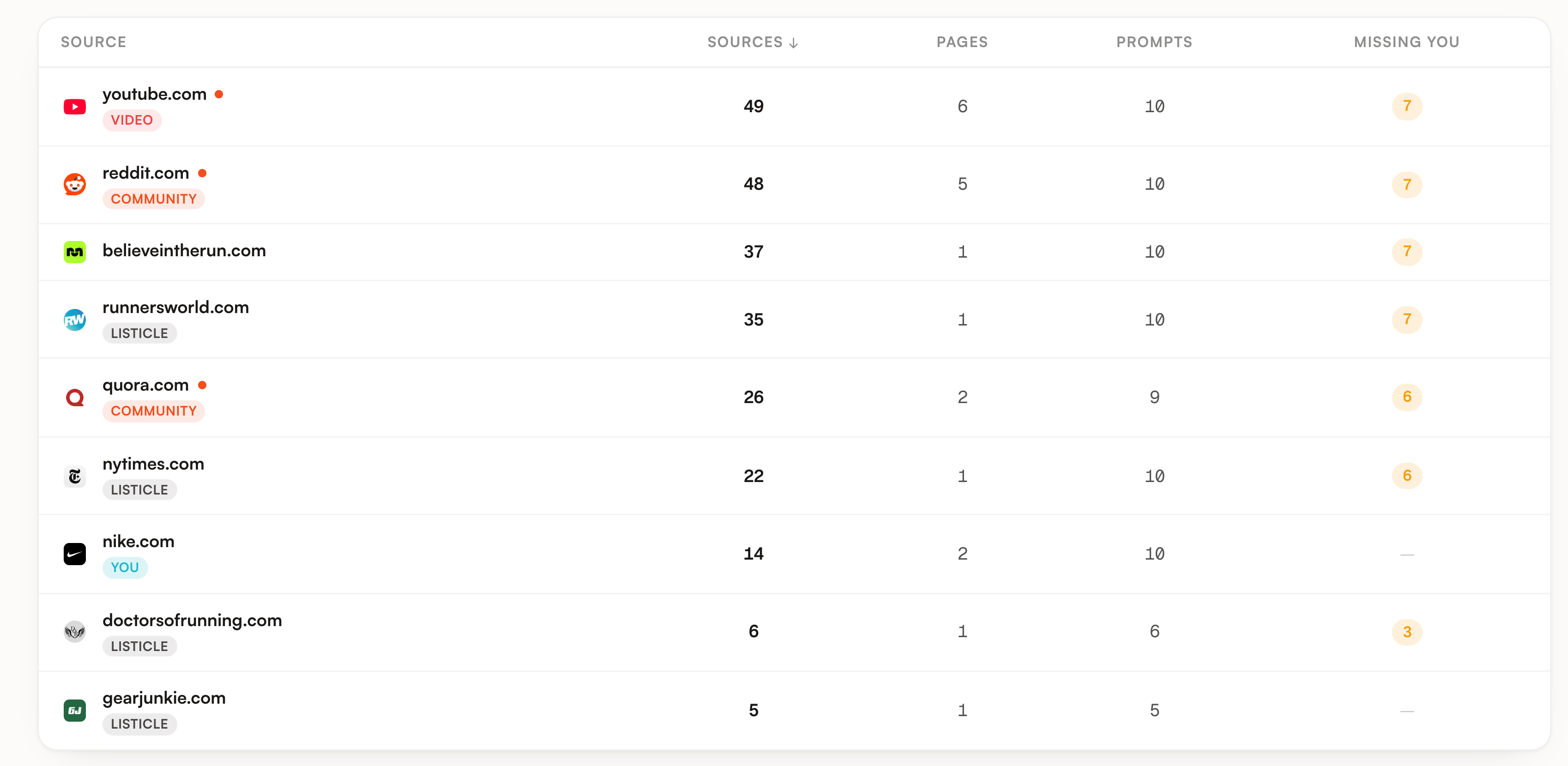
One row is one domain cited in at least one analysed answer. Everything is listed, however small: the Top sources card on the Overview keeps the twenty biggest domains and this table keeps all of them. On our Nike demo workspace that is 9 domains and 242 citations.
What you see
One table, sorted by the Sources column from high to low, ties broken by the number of pages. The line under the title counts the domains and adds up every citation.
| Column | What it holds |
|---|---|
| Source | The domain, its favicon, its content badge, and a small orange dot when it is a place you can post on. Subdomains stay on their own row and are never merged into the parent domain. |
| Sources | How many analysed answers quoted this domain. One answer counts once, whatever number of its pages were quoted in it. |
| Pages | How many distinct URLs of that domain were quoted. URLs are compared after dropping tracking parameters and the trailing slash, so the same page linked twice counts once. |
| Prompts | How many of your prompts had at least one answer quoting the domain. A prompt is asked to several engines, so it can sit behind several answers here and still count once. |
| Missing you | An amber pill, or a dash at zero. It counts prompts, not answers: prompts where this domain was quoted and your brand was not named. |
Missing you deserves a second read, because it is the column that turns this screen into work. A prompt lands in it as soon as one answer quoting the domain came back without your brand, even if another engine named you on the same question. Your own domain never gets a count: the number is forced to zero there, so nike.com shows a dash on the demo while every third party in the table shows a pill.
The four numeric headers sort the table. The first click puts the biggest values on top, a second click reverses it. The count on the right of the toolbar follows the filters, not the table: it reads how many rows are currently shown out of the total.
Two badges sit under the domain name. The content badge is a heuristic read of the domain and of the URL path, with no model involved: Video, Community, Reviews, Wiki, Listicle, Guide, Blog, Homepage. A page can match several at once, the badge shows the primary one in that order, and a domain matching nothing carries no badge at all. The second badge is identity: You on your own domain, Competitor on a rival, whether you declared it or an engine surfaced it on its own.
What you can do
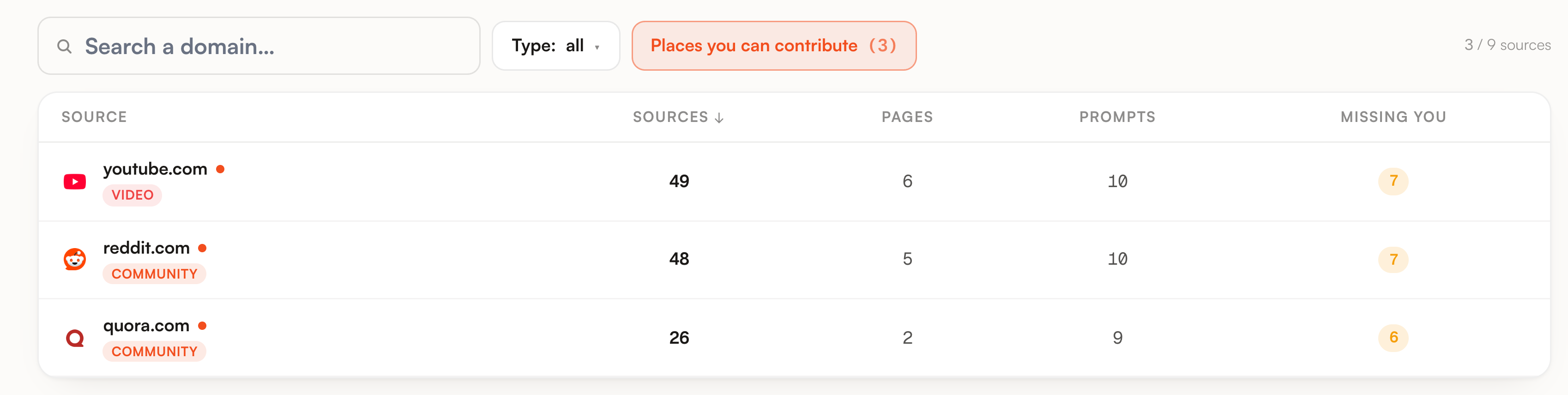
The Places you can contribute button keeps only the contributable rows and carries their count on its label. On the demo it takes 9 domains down to 3.
The search box matches the domain, its type and its platform name, so typing community brings back the community rows. The Type dropdown lists only the types actually present in your data.
Clicking anywhere on a row opens it. Escape closes it, and so does the backdrop.
Export sources gives a CSV or a JSON with one row per cited URL and per answer: source, URL, type, prompt, topic, engine, and whether you were mentioned in that answer.
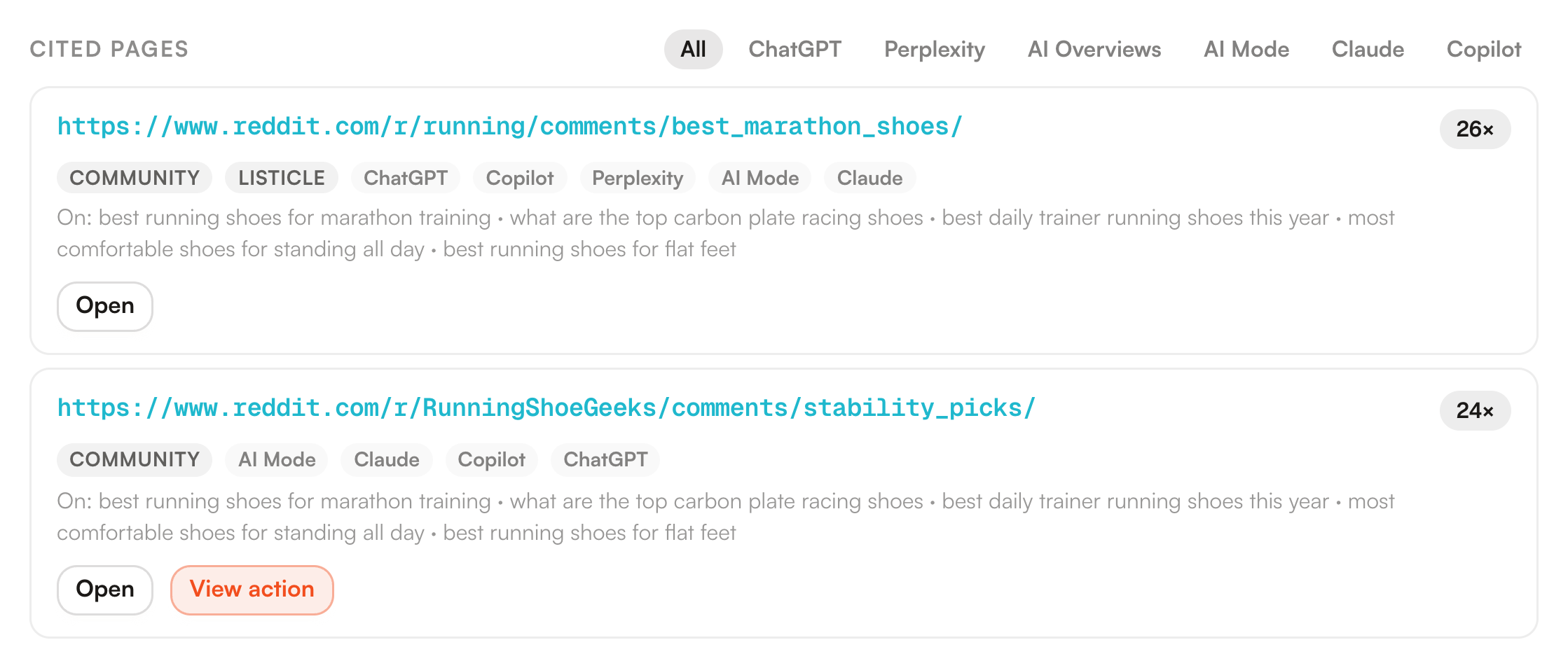
The panel that opens is where the screen earns its keep. It is fetched when you click, not loaded with the page, so it always reflects the current state.
| In the panel | What it gives you |
|---|---|
| The header | The platform name when we know it, so youtube.com reads YouTube, with a link to the site and a Contributable chip when the dot was on. |
| The four stats | Sources, Pages, Prompts and Missing you, computed exactly like the columns of the row you clicked. |
| Cited pages | Every quoted URL of the domain, most cited first, each with its citation count, its type labels, the engines that quoted it and up to five of the prompts behind it. |
| The engine tabs | They filter the page list, and they only appear when more than one engine quoted the domain. Each tab exists because a page under it came from that engine. |
| Open and View action | Open goes to the page itself. View action shows up when an action still open in your plan already targets that exact URL, and it lands on that card. |
You can also arrive here from elsewhere. On Competitors, the Sources number of a brand is a link: it opens this screen with that domain already unfolded. The same works by hand by adding the domain to the URL.
Limits worth knowing
| Limit | What it means for you |
|---|---|
| No date range on this screen | Every number is the current state: for each prompt and each engine, the most recent analysed answer found in the last 8 runs, counted once. There is nothing to add up across weeks and no period picker to change it. |
| The table is cached | It is kept for ten minutes, and rebuilt as soon as a new answer is analysed or you change your brand or your competitor list. |
| The panel stops at 200 pages | A domain quoted through more URLs than that shows the 200 most cited, and a line at the bottom counts the rest. The stats above the list still count everything. |
| Five prompts per page | The On line under a cited page lists at most five prompts, each trimmed to 90 characters. It samples that one page, and the Prompts stat above belongs to the whole domain, so the two are not the same count. |
| The type is a guess from the URL | It reads the domain and words in the path, nothing else. A review page on a plain URL comes back with no type, and a domain in our platform registry reads Community even when it is also something else. |
| A domain with no citation has no row | Asking for one by hand in the URL opens a panel that says it could not load the source. That is deliberate: the endpoint answers nothing on a domain we never measured on your prompts. |
| A citation is not a visit | Nothing here counts traffic. What people actually clicked through to your site is on the AI traffic screen. |
One last thing about the empty state. Before your first run finishes there is no table at all, only a note saying that sources appear once answers have been analysed. That is expected, not a failure.
Where to go next
A domain with a high Missing you is a finding, not yet a task. Three places turn it into one.
| Go to | For |
|---|---|
| Action plan | Citations on a platform we know become a ranked action carrying that platform playbook, which is what the View action button links back to. |
| Fan-out queries | The other half of the picture: the searches an engine ran before answering, and the domains it opened that never turn up in the sources of a captured answer. |
| Competitors | Who was named in the answers you are missing from, and the sentence the engine used to justify it. |
The guide Find where you lose visibility puts this screen at step three, once Prompts has shown where you are absent and Competitors has shown who is there instead.