The AI Traffic screen
The visits assistants actually send you, by engine and by landing page, once the snippet is in place.
What this screen is for
AI Traffic counts people. Someone reads an answer in ChatGPT or Perplexity, clicks the link to your site, and lands on a page. That visit is recorded here with the engine that sent it, the page it arrived on, the country it came from and the device it used.
It is not the AI logs screen, and the two get mixed up constantly. AI logs counts robots reading your pages. AI Traffic counts humans arriving on them. A page can be crawled every day for a month without a single person landing on it, and the reverse happens too. If you are after crawlers rather than visitors, go to AI logs.
This is also the one screen in the product that needs something from you outside the product. Everywhere else, we send the prompts and we fetch the pages. A referral happens on your own site, inside your visitor browser, so nothing can see it unless a tag is installed there. Until that tag is live the screen holds a setup card and nothing else. That is the expected state, not a fault.
What you see
Before the first visit lands, the screen is one card: One-minute setup, with the script tag, a Copy button, a second button that copies a written brief for an AI agent, and three steps. No counters, no chart, no tables, because there is nothing to put in them. The line under your brand name reads Waiting for the first AI referral. If the workspace has no brand at all, you get a different card asking you to add one first.
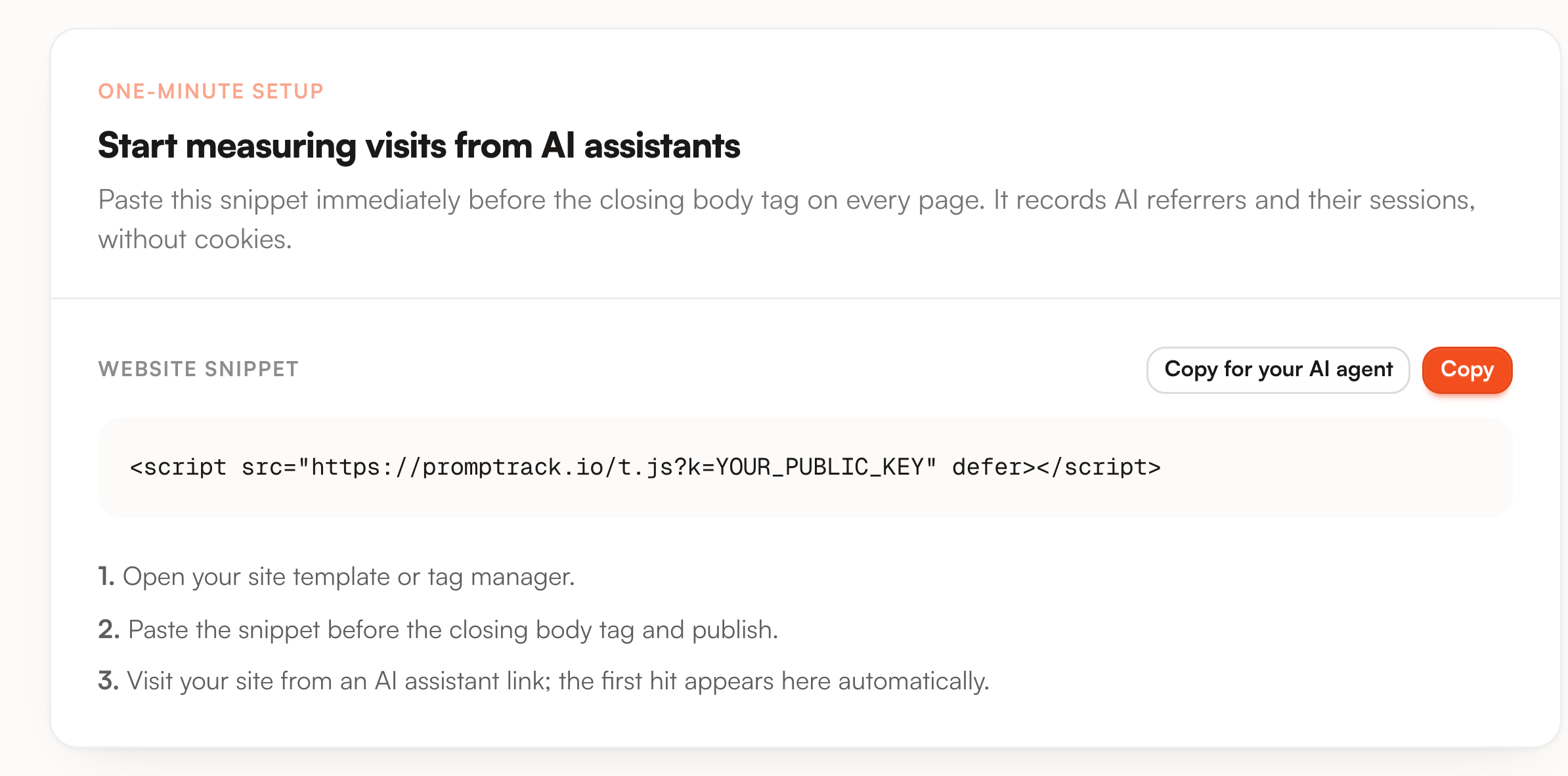
Once one visit exists, the dashboard takes over and a View snippet button appears at the top right. It reopens the same card whenever you need the tag again, for a second domain or a migrated template.
The period selector scopes everything below it. It opens on the last 14 days. Today, Last 7 days, 14, 30 and 90 are one click each, and the two date fields take any custom range, trimmed back to 365 days if you ask for more.
Five counters sit on top.
| Counter | What the number is | Worth knowing |
|---|---|---|
| Visitors | Distinct sessions in the period. A row without a session id, which only happens on visits recorded before session tracking existed, counts as one on its own. | This is the card that carries the arrow. It compares against the previous window of the same length, and it only appears when that window had at least one visitor. |
| Views | Pageviews in the period. | Every page of a referred session counts, not just the landing page. |
| Pages / visit | Views divided by visitors, to two decimals. | A dash means no visitor in the period. |
| Visit duration | Average gap between the first and the last pageview of a session, shown as minutes and seconds. | A single-page visit measures zero seconds. There is no heartbeat and no exit event, so this average is pulled down by every bounce. |
| Bounce rate | Share of sessions with exactly one pageview. | Read it next to the duration. The two describe the same sessions from opposite ends. |

Under them, AI referral traffic draws one bar per day, or one per hour when the range is a single day. Two series share each bar: Visitors solid, Views pale behind it. Click either entry in the legend to drop that series. The scale is linear and its top tick is derived from the busiest Views bar, so the chart rescales when you change the range.
World view sits beside it. It plots visitors by country on a globe you can drag to spin, and hovering a country gives its count. Countries come from the visit rows, so a period with no traffic leaves the globe blank.
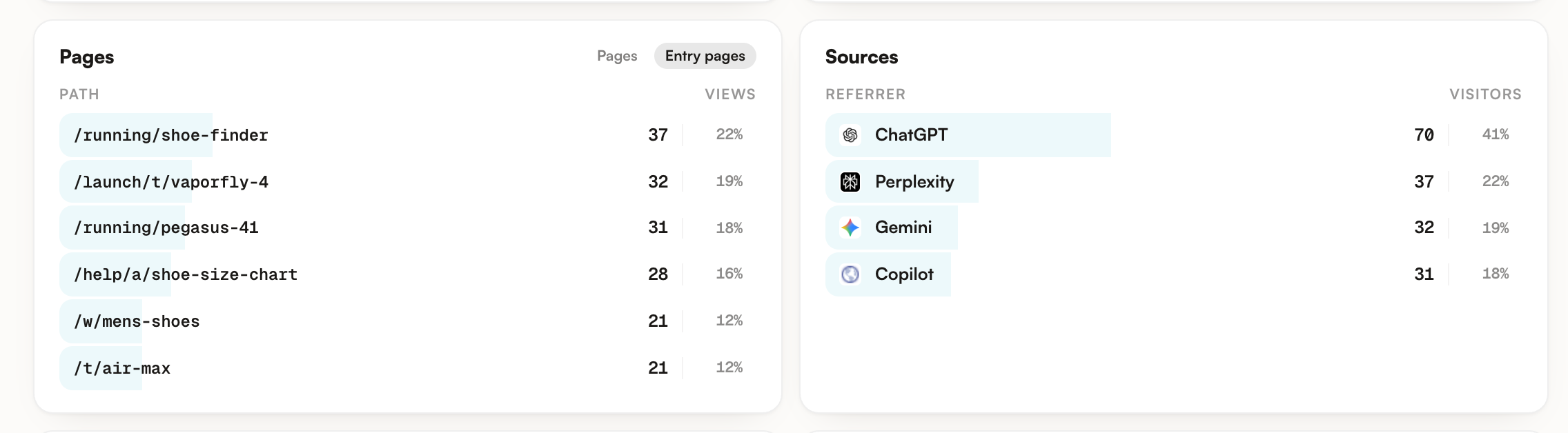
Four cards close the screen. Each row is a bar whose width is its share, with the count and the percentage on the right.
| Card | What it ranks |
|---|---|
| Pages | Paths by pageview, top 8. Percentages are a share of Views. The Entry pages tab beside it ranks the first page of each session instead, and its percentages are a share of Visitors. One header serves both tabs, so it keeps saying Views while Entry pages is showing sessions. |
| Sources | Visitors per engine, with the engine favicon. At most five rows can appear, because five assistants are recognised as referrers. |
| Location | Visitors per country, top 8. Region and city are collected on the row but shown nowhere, a deliberate call: the free geolocation database is not precise enough at city level to publish. |
| Devices | Visitors per category, desktop, mobile or tablet. Only categories with at least one visit are listed. |
What you can do
First, install the tag. It takes one paste and it is the same tag for every page of the site.
Open AI Traffic and press Copy. The tag points at our script and carries the project key in the query string. Each brand has its own key, so a workspace with three brands installs three different tags, one per site.
<script src="https://promptrack.io/t.js?k=YOUR_PUBLIC_KEY" defer></script>
On every page, which in practice means the site-wide layout, the base template, or a tag manager. The tag is deferred, so it never blocks rendering.
It must return the script. A key that matches no project returns a 404, which is the quickest way to catch a truncated paste or a key copied from another workspace.
Ask an assistant something that surfaces your site, click through, then reload AI Traffic. The row is written when the beacon arrives. Nothing is batched and no nightly job has to run first.
The second button on the card, Copy for your AI agent, copies the same tag wrapped in a written brief: where to paste it, how to verify it, and what the script does and does not do. It is there for the common case where the person doing the install is not the person reading this screen.
In Get started, the step called Plug AI traffic ticks itself as soon as the first visit is stored, so you do not have to come back and confirm anything.
Once data flows, three readings pay for the setup.
| Read | What it tells you |
|---|---|
| Sources against your visibility | An engine that cites you often and sends almost nobody is a placement problem, not a visibility problem. The reverse, few citations and steady clicks, means the citations you do get are the ones people act on. |
| Entry pages | The pages assistants actually hand to people. They are often not the pages you would have chosen, and they are the ones whose facts, prices and availability have to be right. |
| The arrow on Visitors | It compares with the previous window of the same length, so setting the range to 30 days answers whether this month beat the last one. |
Limits worth knowing
The snippet is deliberately small, and it is worth knowing exactly what it moves before you ask a client to put it on their site.
| What each beacon sends | What it never sends |
|---|---|
| The path of the page, taken from the address bar. Query strings and anchors are not part of it. | No cookie. Nothing is written to one, read from one, or needed from one. |
| The referring URL, as the browser reports it. | No name, email, form field or account identifier. |
| A random session id generated in the tab. | No identifier that survives the tab or follows the visitor to another site. |
| The project key, so we know whose site it is. | No user agent string on the stored row, only desktop, mobile or tablet. |
Two gaps follow from that, and neither is fixable with a better tag. AI Overviews and AI Mode inside Google Search send a google.com referrer, which is indistinguishable from a click on a classic blue link, so those visits are not counted here even though the engines are tracked elsewhere in Promptrack. And an assistant that passes no referrer at all, which happens with some native apps, is invisible to referral analytics of any kind, ours included. Read the numbers as a floor.
The referrer is captured once, on the first page of the tab, and reused for every page after it. That is what lets a five-page visit count as one visitor from ChatGPT. It also means a page opened deep in the session is attributed to an assistant the visitor left twenty minutes earlier. A visit that starts with no external referrer, a bookmark or a typed address, sends nothing at all.
Measurement starts the day the tag goes live. There is no history to import and no backfill, and taking the tag off stops the screen at the last visit it saw.
One quirk to expect: the Last visit line in the header is computed inside the selected period. Pick a range with no traffic on a project that has plenty and the line reads Waiting for the first AI referral while the panels below show zeros. Widening the range puts it right.
Last, the key in the tag is public by design, as it is for every browser tag: anyone viewing the source of your site can read it. It can do one thing, record visits. The crawler and log endpoints behind AI logs use a separate secret token that never appears in a page, so a copied tag cannot be used to push crawler data. Treat these numbers as web analytics rather than as an audited counter.
Where to go next
AI logs is the other half of this pair and the page to read if you came here looking for crawlers. It counts the bots that fetch your pages, which is a separate feed with its own setup, a Cloudflare Worker or your server logs.
Sources explains the other direction of the same question: which domains the engines quote when they answer about your market. A domain quoted often that never mentions you is why your referral numbers stay flat.
The Overview screen holds the visibility side. Comparing it with Sources here is what separates being named in answers from being clicked on.