The Prompts screen
Your rank tracker: one row per buyer question, which engines cite you, your aggregated rank and the answer behind every number.
What this screen is for
One row, one question your buyers ask an AI. The row tells you which engines named your brand on it, your best position across them, how the answer talked about you, and which of your pages the engine linked to.
Every other screen aggregates this one. Topics groups the same rows by theme, the scorecard turns them into a single number, the action plan reads them to decide what to work on. Come here when the question is per question: which buyer question do I win, which one do I lose, and on which engine.
What you see
At the top, the brand you are on, the last run and the period. The last run line gives the moment the most recent completed run started, in your display timezone, so a long run finished later than the time you read there.
The period defaults to the last 30 days and accepts presets or an explicit from and to, up to 366 days. It is not a cosmetic filter: it selects the runs the whole page is computed on, so widening it can move every number here. With no analyzed run inside it, the table is replaced by a short empty state instead of showing zeros.
The four cards
| Card | What it actually counts |
|---|---|
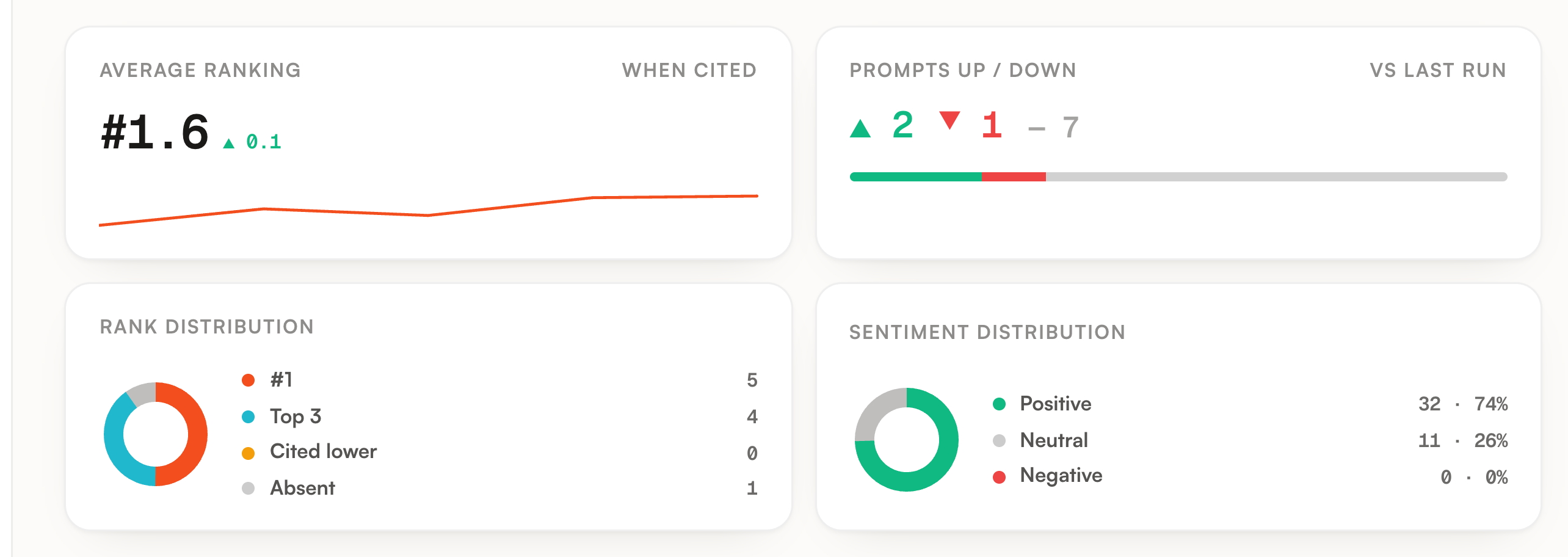
| Average ranking, when cited | The average of your best position per prompt, over the prompts where at least one engine ranked you. Prompts with no rank are left out, so an absence never drags this number down. The arrow compares it with the previous state and turns green when the average moved closer to first place. |
| Prompts up / down | How many prompts gained, lost or held their best position against the previous run. It needs a second run inside the period, and says so when there is only one. |
| Rank distribution | Your prompts split across first, top three, cited lower and absent. One prompt lands in exactly one slice, on its best position. |
| Sentiment distribution | Positive, neutral and negative counted on answers, not on prompts. A prompt cited by three engines contributes three. Only answers that named you and came back with a sentiment are counted. |
The first card also carries a sparkline of that average run by run, drawn so that a better rank sits higher. A run where nothing cited you breaks the line rather than joining two points across a hole.
The columns
| Column | What it holds |
|---|---|
| Prompt | The question exactly as it is sent, with the buyer country flag and the topic it belongs to. |
| Engines | One small logo per engine enabled on the brand, carrying the state of that engine on this prompt. |
| Rank | Your best position across the engines that ranked you, plus the movement against the previous run. |
| Sentiment | The sentiment of the single answer where you rank best. Analyzed but never named reads as absent. |
| URL | Your own page the engine linked to, meaning the first cited URL on your domain. Never a third party source. Hovering opens one card per engine that cited a page of yours, with its position and the sentence around the citation. |
| Visibility | The share of the engines configured on the brand that named you on this prompt. |
| Trend | That same coverage run by run inside the period. Runs without data stay holes in the line. |
| Top brands | Up to three brands named in the answers, best position first. Hover for the full list, up to twelve, with your own brand highlighted and its position. |
| Top sources | Up to three cited domains. Hover for the list of cited URLs, up to twelve. |
| Sources | How many distinct domains were cited across the answers on this prompt. |
The Engines column and its ring
This is the densest cell on the screen and it carries four different states. The tooltip on each logo spells the state out, including your position when there is one.
| What you see | What it means |
|---|---|
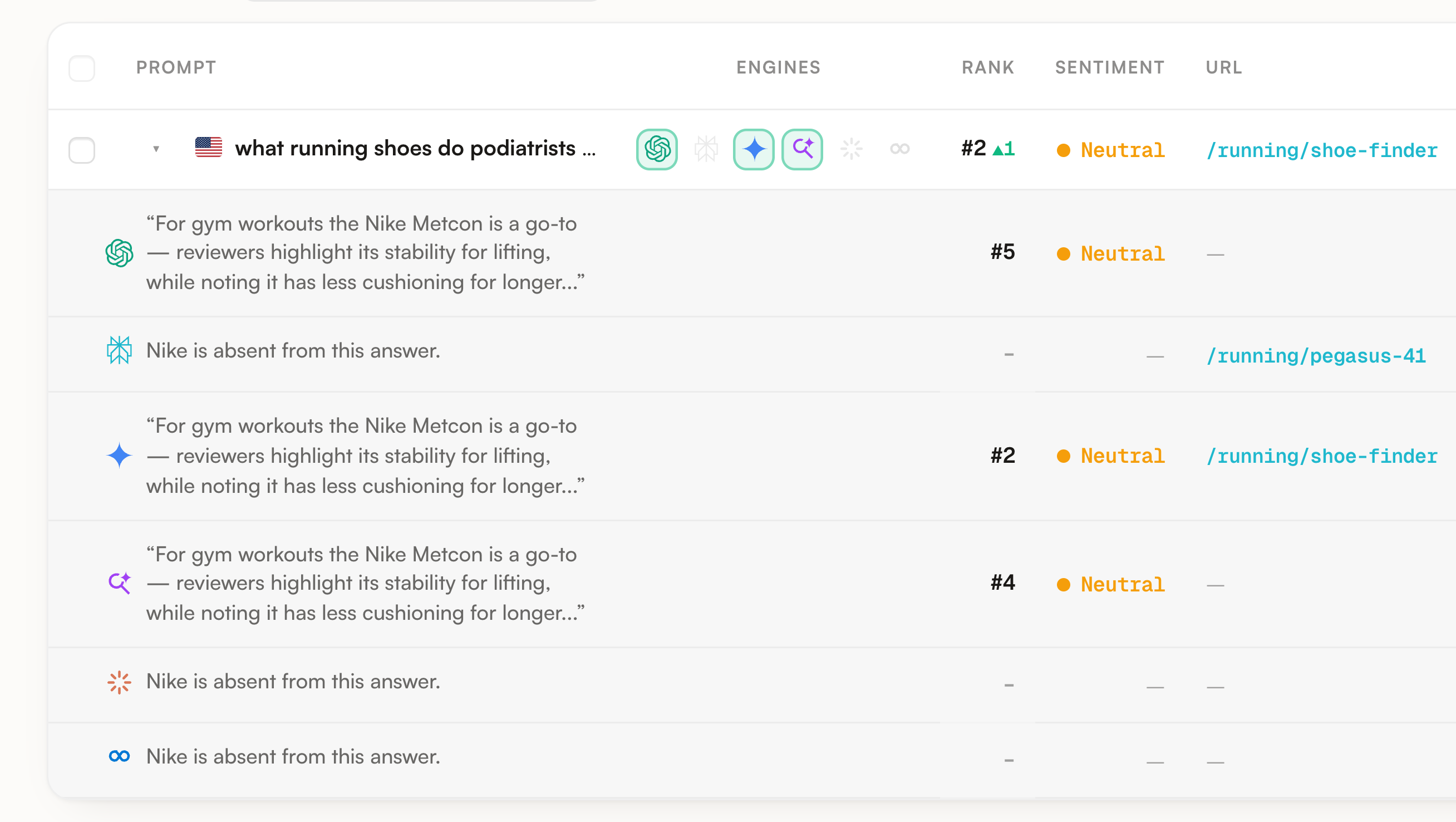
| Logo with a green ring | That engine named your brand in its answer. |
| Faded logo | That engine answered, we analyzed it, and you are not in it. |
| Almost invisible logo | No analyzed answer from that engine in this period. Often a prompt that is not tracked on it. |
| Spinner | That answer is being fetched or analyzed right now, and the cell fills itself in place. |
Rank, and the dash that is not an absence
Rank is the best position you hold, meaning the lowest number among the engines that ranked you. It is never an average, so one strong engine is enough to carry the row and a weak one never dilutes it. The arrow next to it compares that best position with the previous run, and entering or leaving the ranking shows a direction with no amplitude, since there is no distance to measure.
Opening a row
The chevron on the left expands the row into one line per engine: the sentence where your brand appears, that engine position, its sentiment and the page it linked to. An engine with nothing to show says so rather than reading as an absence.
A line can say you are absent and still show one of your URLs. That is not a contradiction: the engine read a page of yours and linked to it without ever naming you in the answer. It is a good place to start, because the page is already trusted enough to be cited.
Clicking anywhere else on the row opens the full prompt: the rank history over the last eight runs that analyzed it, your position and sentiment on the selected engine, the whole captured answer, the brands in order of appearance with how many times each is named, and the sources cited. That modal is also where you pause a single prompt.
What you can do
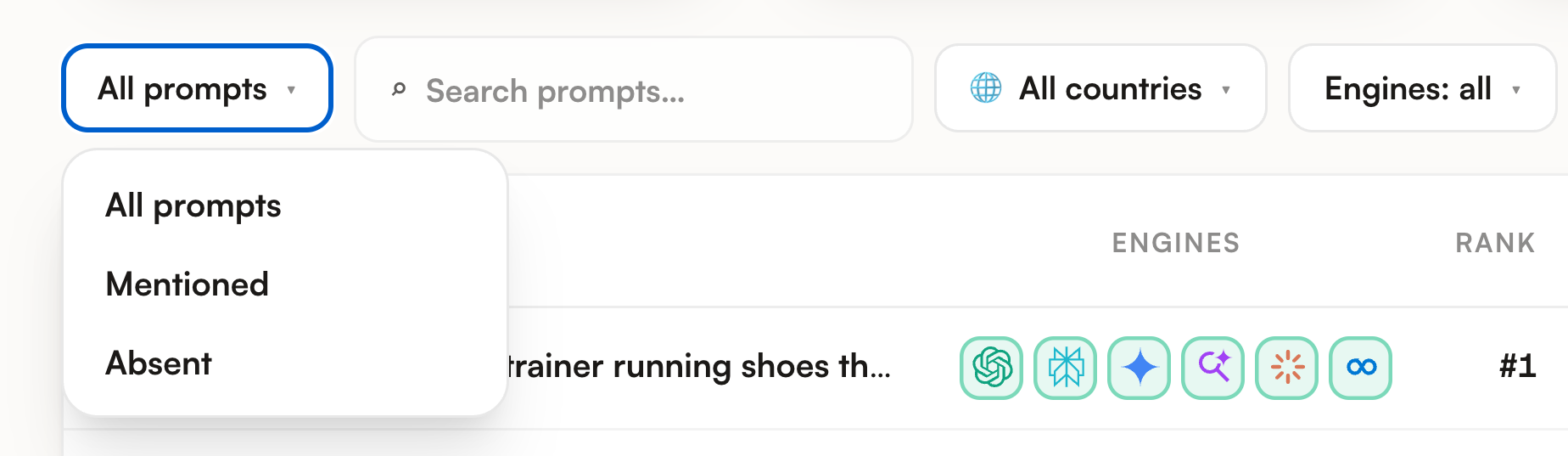
The scope dropdown keeps all prompts, only the mentioned ones or only the absent ones. Next to it, free text search on the prompt, a country filter listing only the countries actually present on your rows, and a Filters panel with rank and sentiment chips. All of it runs in the browser, and the counter on the right of the toolbar says how many rows survive out of the total.
The Engines dropdown reloads the page on that one engine. It is not a display filter: the cards, Visibility and the Engines column are recomputed on it alone, which is why Visibility then reads either zero or one hundred on every row. It is the right move to answer why one engine is weak, and the wrong one to read your overall position.
Click a header to sort ascending, click the same one again to reverse. Prompt, Rank, Sentiment, URL, Visibility, Trend and Sources sort; the two favicon columns do not. Rows without a rank are pushed to the end when you sort by Rank. With no click, the table is ordered by Visibility, highest first.
The Columns dropdown carries eight toggles. Engine ranks hides two columns at once, Engines and Rank, because they are the same block read twice: presence, then position.
Tick rows and a bar appears at the bottom: re-run now, pause, resume, set a topic, set a country, copy the texts, delete. Deleting asks for confirmation and takes the history with it. One action covers up to a hundred rows.
One per line, 10 to 300 characters each, up to 50 in a batch, and a line already tracked on this brand is skipped rather than duplicated. You pick the engines, six offered with three ticked by default, the buyer country and an optional topic that suggests the ones you already use. They are asked immediately in their own run: the new rows land at the top with a spinner per engine and fill in live, so you do not wait for Monday.
Export answers previews the first rows exactly as the file will be written, tells you the real total, then downloads CSV or JSON.
The export is the raw history, not the current state of the table. It writes one line per analyzed answer in the period, so a prompt asked on three engines across four runs comes out as twelve lines. Each line carries the date, the prompt, its topic, the engine, the country, whether you were mentioned, your position, the sentiment, the competitors named, the sources cited, their types and the answer text.
Limits worth knowing
| Limit | What it means in practice |
|---|---|
| 200 active prompts | Across the whole workspace, every brand together, all re-run every Monday. Pausing one frees its slot immediately and keeps its history; resuming takes a slot back and is refused when there is not enough room left. |
| Active prompts only | This table lists what is being tracked. A paused prompt keeps everything it has collected but stops appearing here. |
| Visibility is a share of engines, not of answers | The denominator is the engines configured on the brand, not the answers that came back. A prompt asked on two of the six engines you enabled cannot go above 33 percent, and that is a setup detail rather than a visibility problem. |
| Engines and country are set per prompt | Two rows in the same table can be asked on different engines and from different markets. When a row looks thinner than its neighbours, check its engines before reading it as a loss. |
| Row sentiment is one answer | It is the sentiment of the answer where you rank best, not a summary across engines. Expand the row to see whether the others agree. |
| Up and down need two runs | Movement is measured against the previous run inside the period. One run in range means no movement to report, and the card says so instead of showing zeros. |
| The period is capped at 366 days | Ask for more and the start date is pulled back to that limit. |
| Live rows stop polling | Freshly added prompts refresh themselves for about five minutes. After that the row stops asking and tells you to come back in a minute, which does not mean the run failed. |
Where to go next
A single row tells you where you stand on one question. Two screens turn that into something you can act on.
Topics reads the same prompts grouped by buying theme, which is how you find out whether an absence is scattered or covers a whole part of your business. Competitors answers the other half: when an engine ranked someone above you, that screen carries the sentences it used to justify it.
The Find where you lose visibility guide runs both in order, starting from the Absent filter on this very screen.